

Usuários de todo mundo informaram que a Adobe parece não ser capaz de fornecer um download correto para o Adobe Acrobat Reader DC (21.007.20099) na versão de 64 bits. Em vez de disponibilizar o Acrobat Reader DC, o Acrobat DC é disponibilizado para download.
O novo Reader de 64bits é projetado para detectar automaticamente a assinatura e adaptar o ambiente do aplicativo e os recursos com base na assinatura.”
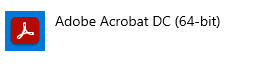
Este é um issue com o software Adobe Acrobat Reader DC 2021 sendo reconhecido como Adobe Acrobat DC 2021 (mais especificamente a versão 21.007.20099). As mudanças foram feitas pela Adobe, em termos de quando eles criaram o novo pacote de instalação de 64 bits para Adobe Reader.
Há um modo de fazer com que o produto seja reconhecido da forma correta, que é utilizando o instalador fornecido pelo suporte da Adobe, após realizar uma desinstalação limpa do Reader, e atualizar o produto pela instalação corrigida.
Estas são boas práticas de governança de ativos de software ou Software Asset Management (SAM) para sua empresa.
Para os produtos que ainda não sofreram atualização, podemos seguir de acordo com a documentação da Adobe, que está neste link, e desabilitar as atualizações automáticas, que vem ligadas como padrão para todas as instalações do Adobe Reader.
Correção da instalação Adobe Reader
Passo 01:
Primeiramente, devemos desinstalar o Adobe que está sendo identificado como Adobe Acrobat DC pelo painel de Adicionar ou Remover programas
Passo 02:
Após o procedimento de remoção do produto, devemos remover todos os arquivos residuais da instalação, utilizado a ferramenta Adobe AcroCleaner, que foi disponibilizada pelo suporte da Adobe
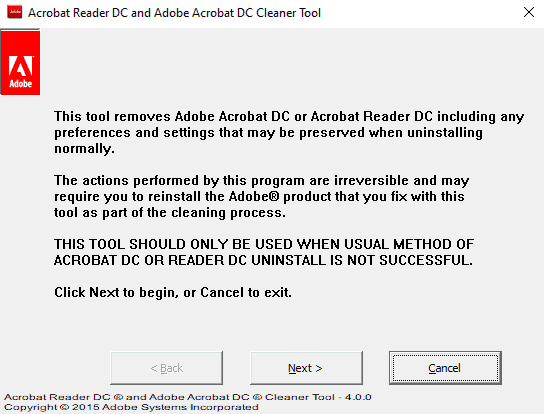
Passo 03:
Na tela que seleciona o tipo de produto a ser desinstalado, selecione Reader
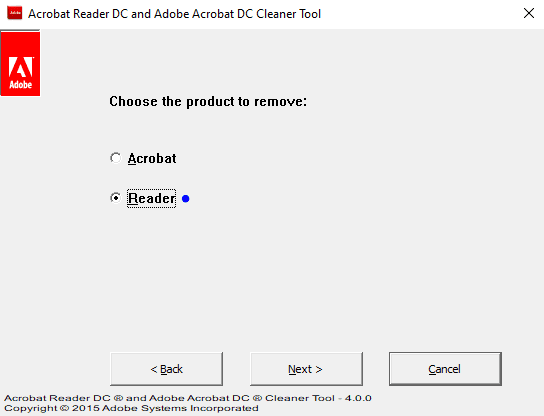
Siga o procedimento de limpeza até sua conclusão.
Passo 04:
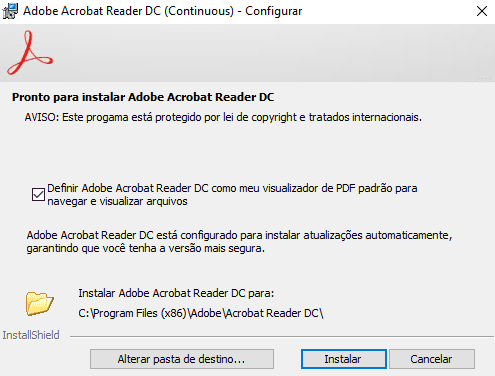
O próximo passo será instalar a versão do Reader que foi fornecida pelo suporte, que está encapsulada no pacote e distribuição corretos, e é identificado corretamente pelo Snow.
Passo 05:
Prossiga com a instalação até o seu final. Após o procedimento, o Adobe Reader deve estar instalado corretamente no seu painel de Adicionar e Remover programas.

Passo 06:
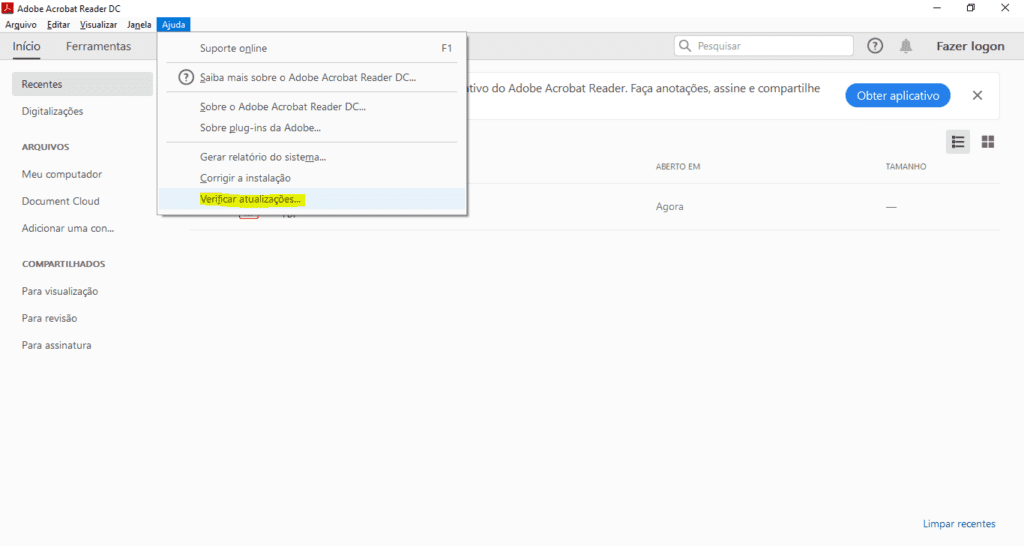
Em seguida, abra o Adobe Reader e no menu Ajuda, clique em Verificar Atualizações.
Passo 07:
Atualize o produto, por este método, até não haver mais atualizações disponíveis para seu software.
Pronto! O seu Adobe Reader agora deve estar instalado e com todas as atualizações feitas, porém sendo reconhecido como Adobe Reader, de fato, no portal de gestão e ativos de software SAM.
O que é o PDF, formato usado pelo Adobe Reader
PDFs movem o mundo. A Adobe inventou o Portable Document Format (mais conhecido como PDF) para exibir e compartilhar documentos com segurança, independentemente de software, hardware ou sistema operacional e, agora, seus trabalhos ou documentos oficiais mais importantes dependem dele.
O PDF agora é um padrão aberto mantido pela International Organization of Standardization (ISO). Os documentos PDF podem conter links e botões, campos de formulário, áudio, vídeo e lógica de negócios. Eles podem ser assinados eletronicamente e exibidos facilmente no Windows ou no macOS usando o software gratuito Acrobat Reader DC.
Os PDFs atendem a padrões
Seus arquivos PDF atendem aos padrões ISO 32000 para transmissão de documentos eletrônicos, inclusive padrões para usos especiais, como PDF/A para arquivos, PDF/E para engenharia e PDF/X para impressão. Além disso, você pode criar PDFs em conformidade com uma variedade de padrões de acessibilidade para facilitar o uso do conteúdo por pessoas com deficiências.
Não é necessário imprimir mais nada
É fácil assinar um PDF eletronicamente. Basta usar o aplicativo Adobe Acrobat Reader para dispositivos móveis ou o aplicativo Adobe Sign para dispositivos móveis. Acesse seus PDFs em qualquer navegador ou sistema operacional. Para gerenciar processos de assinatura eletrônica ou digital com validade legal, experimente o Adobe Acrobat DC ou o Adobe Sign.
Você pode digitalizar documentos e formulários impressos para salvá-los como Adobe PDF e obter arquivos inteligentes fáceis de pesquisar, compartilhar e armazenar. Os Adobe PDFs usam uma tecnologia de reconhecimento óptico de caracteres (OCR) para que você edite e faça comentários nos documentos digitalizados. Mais que um visualizador de PDF, o Adobe Acrobat Pro DC é uma solução de PDF completa para criar, editar e converter arquivos PDF em outros formatos.
Um pouco da história
Em 1991, o cofundador da Adobe, Dr. John Warnock, iniciou a revolução do impresso ao digital com uma ideia que ele chamou de “The Camelot Project”. O objetivo era permitir que qualquer pessoa pudesse captar documentos de qualquer proveniência, enviar versões eletrônicas desses documentos a qualquer lugar e exibi-los e imprimi-los em qualquer computador. Em 1992, o Camelot se tornou o formato PDF. Hoje, ele é o formato de arquivo no qual empresas no mundo todo confiam.
Outrora chamado Adobe Acrobat Reader, com o lançamento da versão (6.0) a Adobe Systems unificou o Acrobat eBook Reader e o Acrobat Reader em um só aplicativo. Portanto, não é mais necessário o uso de um programa a parte para desfrutar dos livros. Todos os recursos para uma leitura presentes no antigo Acrobat eBook Reader estão disponíveis no Adobe Reader.
Embora muito útil, tem sido constantemente criticado por todos por exigir muito do computador mesmo sendo tão simples, perdendo espaço para outros leitores PDF.
O Adobe Reader (antigamente conhecido como Adobe Acrobat Reader) é um software que permite que o usuário do computador visualize, navegue e imprima arquivos no formato PDF. Este tipo de arquivo é muito comum em documentações gerais (manuais de instrução, apostilas, eBooks). Por ser multiplataforma, está disponível para diversos sistemas operacionais.
Tag: leitor de pdf export pdfs criar uma conta leitor de pdfs adobe scan escolha sua região adobe livecycle baixar avaliação do acrobat programa antivírus deve permitir confirma que leu nota seu programa antivírus edit text instalação de software pdf pack clicar em baixar documentos compartilhados edit pdfs adobe reader xi avaliação do acrobat pro pdf documents ler pdf adobe inc editar pdf document cloud flash player assinatura digital google drive word excel licenciamento de software contrato de licenciamento pdf file última versão adobe flash documento pdf adobe systems criar pdfs versão do reader visualizador de pdf adobe pdf